Weighbridge software for Pakistan
ScalingSoft runs computerized kantas: it reads the weight from your indicator, works out Kaat, Dhara and the charge, and prints a clear Urdu and English slip. Screens in English or Urdu, in your mandi's own words. Used at 20+ weighbridges across Pakistan since 2013.
2013 سے پاکستان کے 20 سے زیادہ کمپیوٹرائزڈ کانٹوں پر چلنے والا ویٹ برج سافٹ ویئر
- Since 2013
- 20+ weighbridges
- Mandis, rice, flour and steel mills
- Urdu screens and slips
The problems it solves
Every kanta owner knows these. ScalingSoft was built in the mandi, around them.
Weight disputes
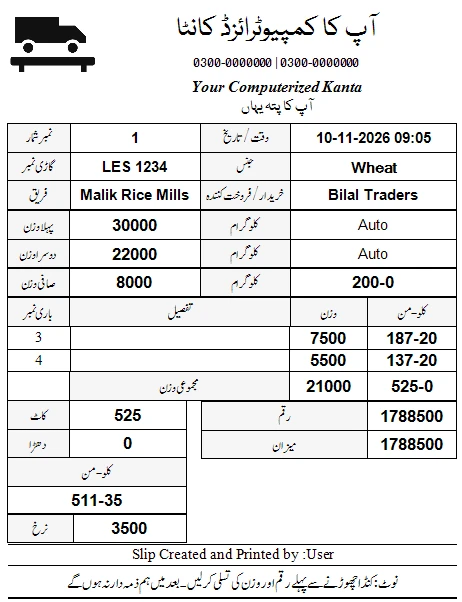
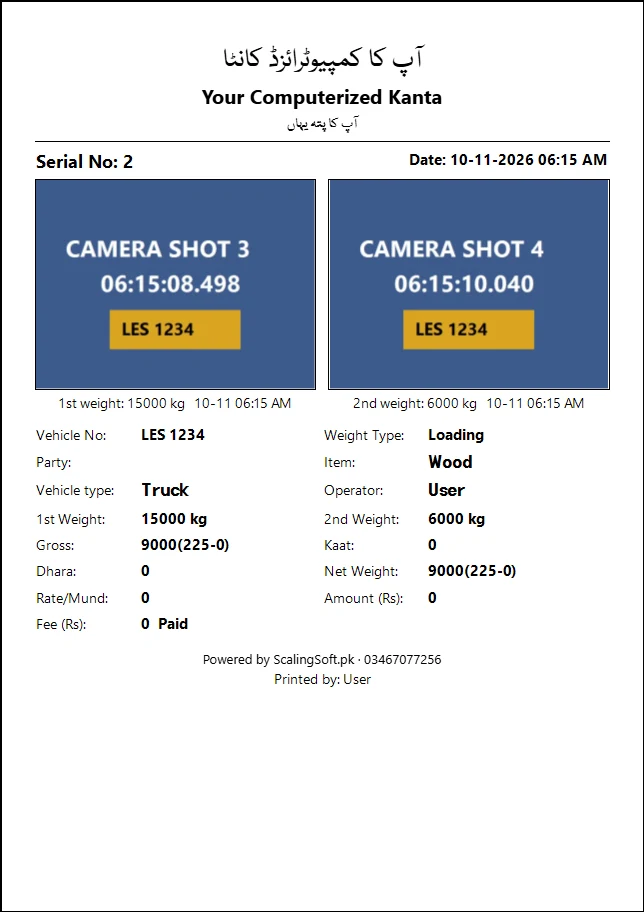
The weight comes straight from the indicator, only once it is stable, and is printed with the date and time. Add a camera and the vehicle's picture is on the slip too.
Lost or handwritten slips
Every ticket is saved by serial number. Find it by serial or part of the vehicle number and reprint it in seconds.
Operator fraud and tampering
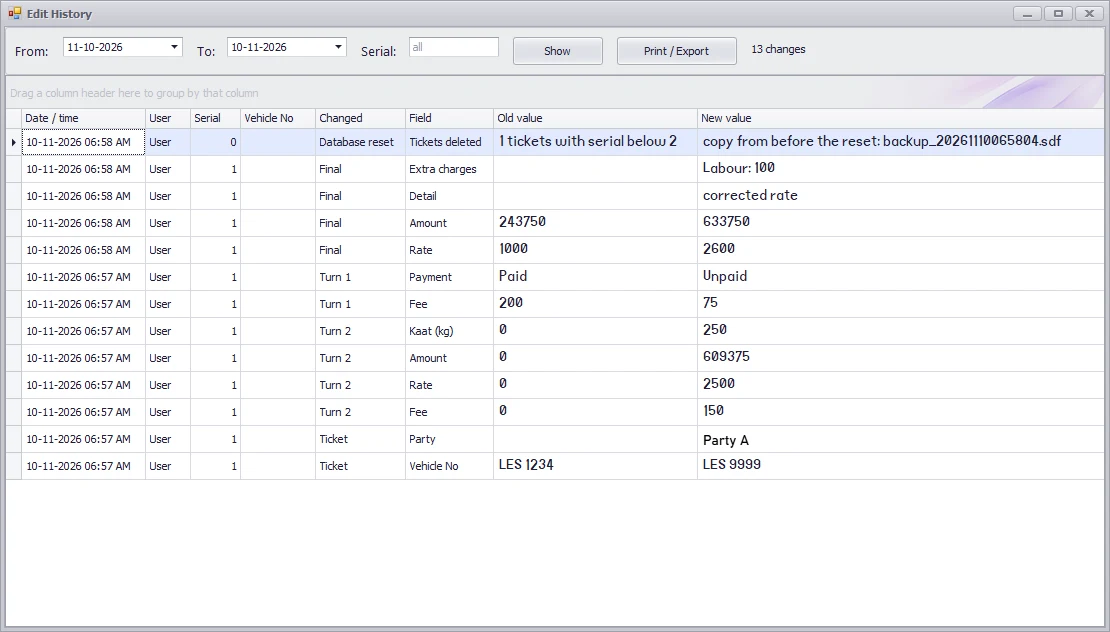
Print limits per slip, "Printed by" and copy number on every slip, typed weights marked Manual, and a history of every edit with the old and new value.
End-of-day reports by hand
One click gives the Day Close per operator: turns, fees collected and unpaid, expenses and cash in hand.
Weighbridge software features
Made for how Pakistani weighbridges actually work: munds, Kaat, Dhara, several turns per vehicle, and slips in Urdu.
Live indicator reading
Reads the weight over the serial port and waits for a stable reading before F2 captures it.
First, second and multi-turn
Loading, unloading and daily trips, with any number of turns per vehicle and one combined multi-turn slip.
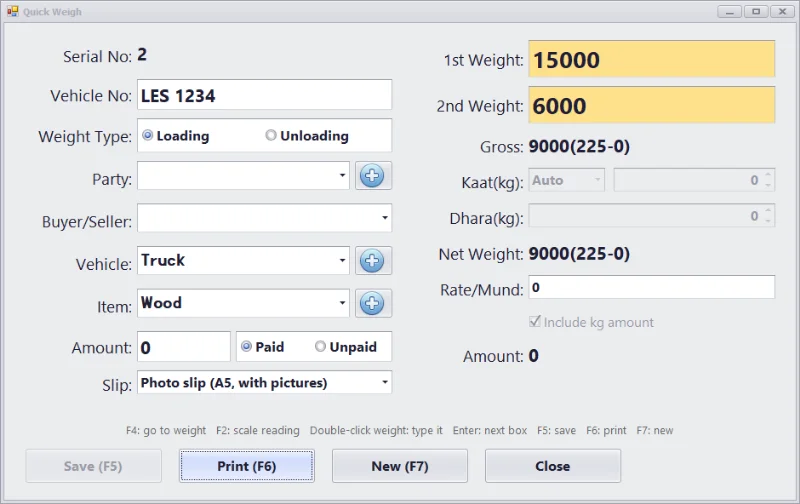
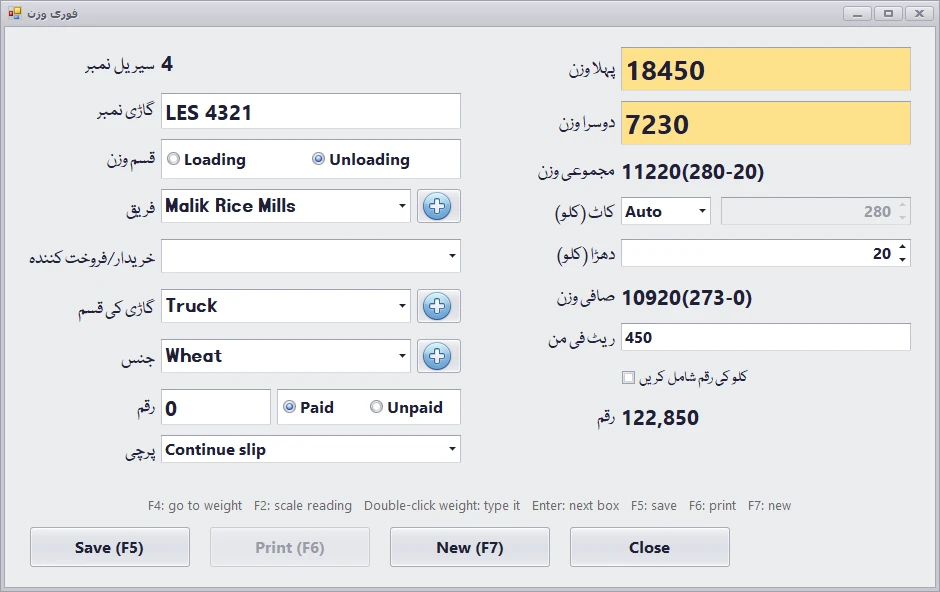
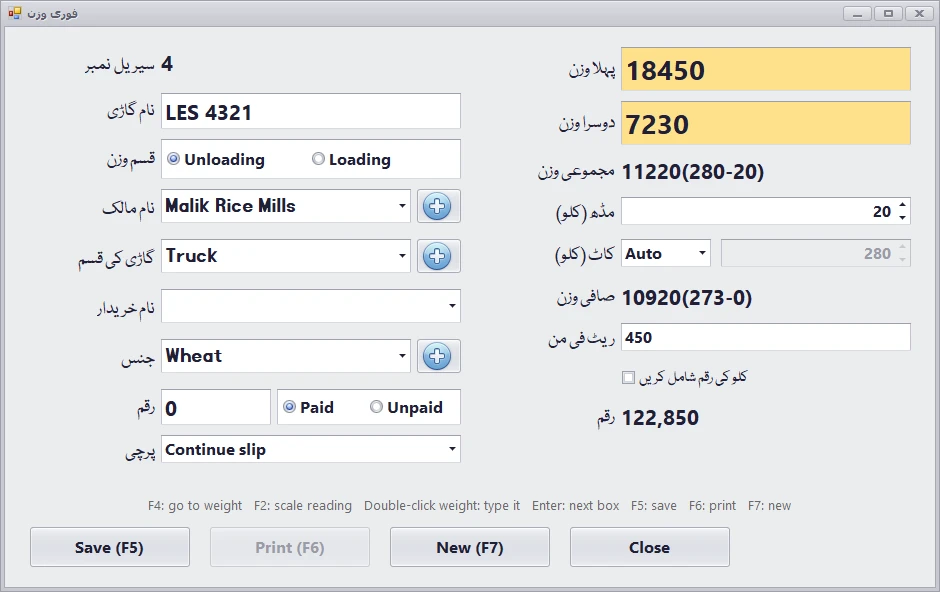
Quick Weigh
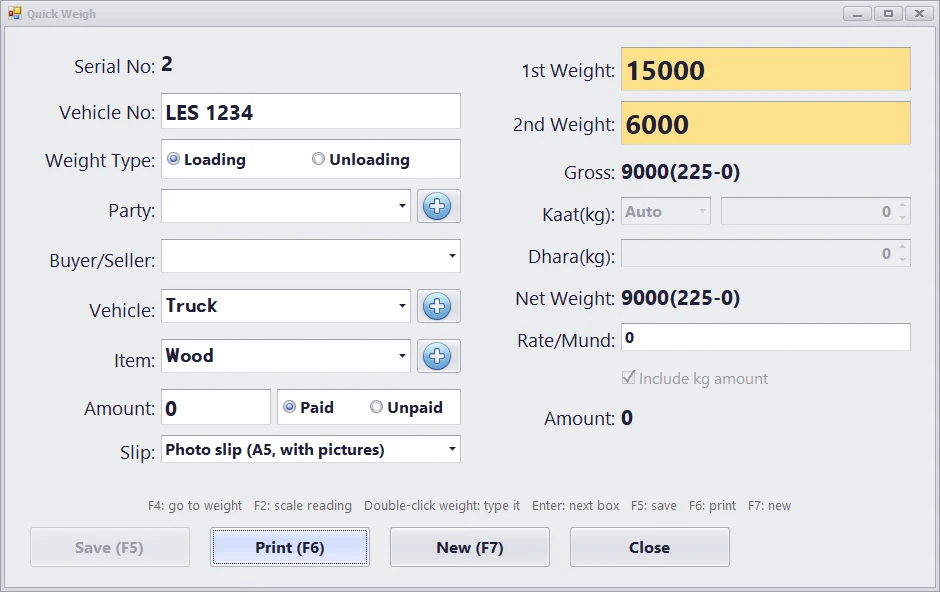
Both weights on one screen and saved in one go, with F2, F5 and F6 keys for a busy queue.
Kaat and Dhara
Automatic Kaat in kg per mund (decimals such as 1.5 allowed) or a manual value, plus Dhara, on unloading.
Rate per mund or quintal
Charges per 40 kg mund or per 100 kg quintal, with extra charge lines and Paid or Unpaid fees.
Urdu and English slips
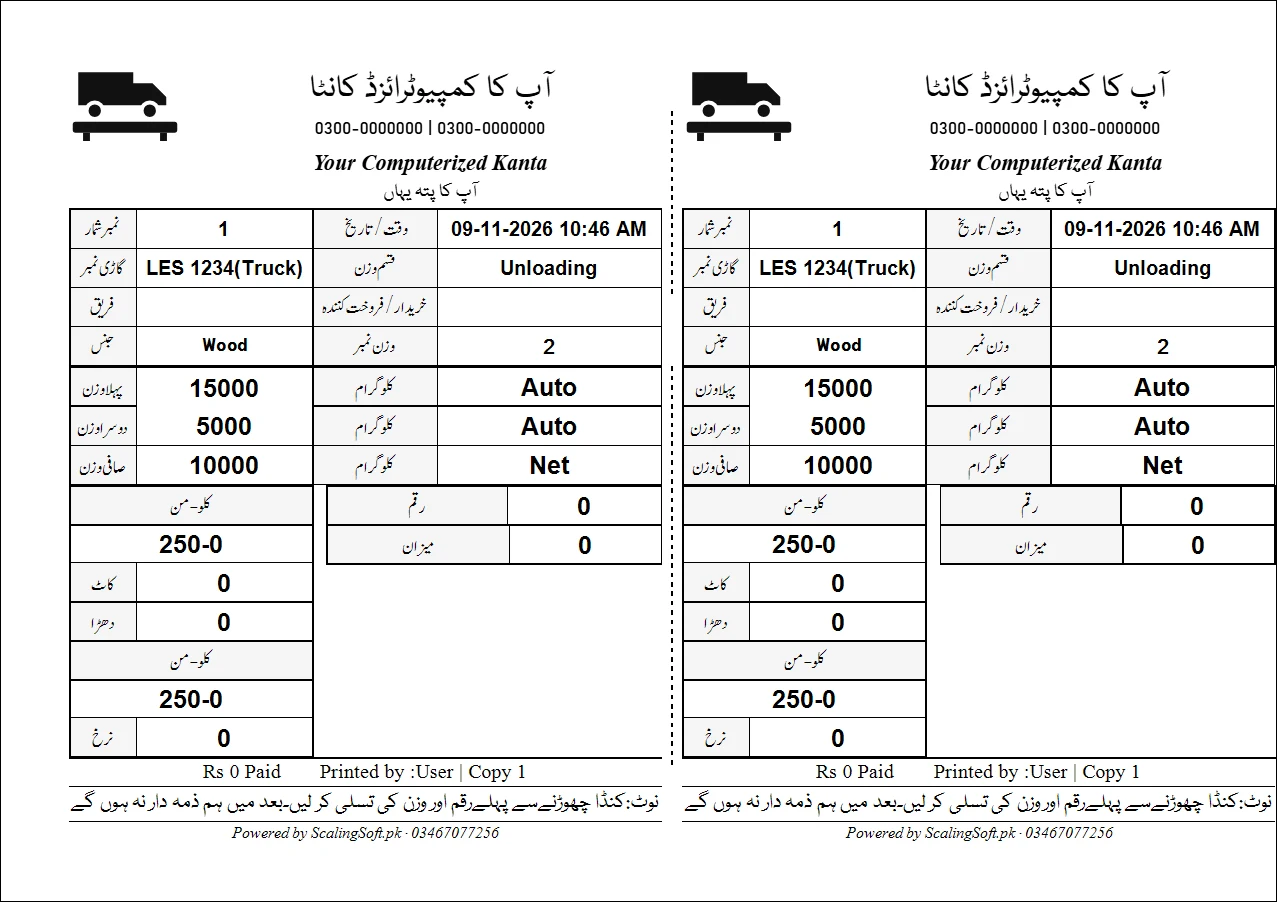
Your kanta's name, logo, address and up to five proprietors with phones, on plain paper, two copies a page, pre-printed slips or a book-size slip.
Reports
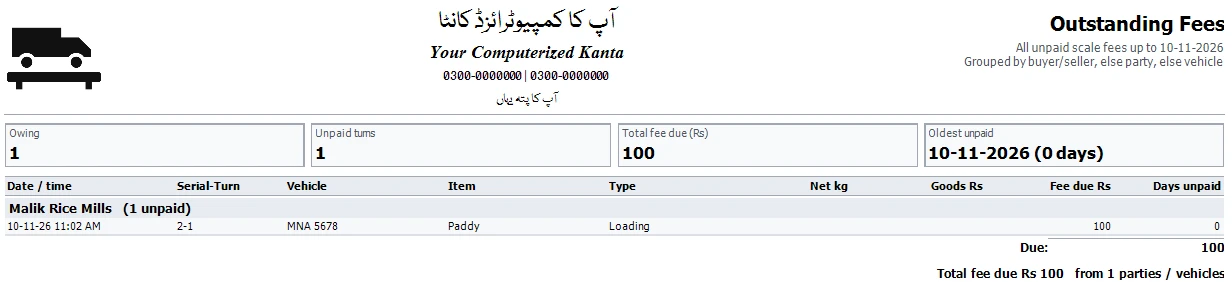
Today, date range, serial range, by vehicle, by party, outstanding fees, expenses and the Day Close, to print, PDF or Excel.
Print limits and edit history
Operators print each slip a set number of times; every change to a saved ticket is logged with who, when, old and new value.
Camera pictures (optional)
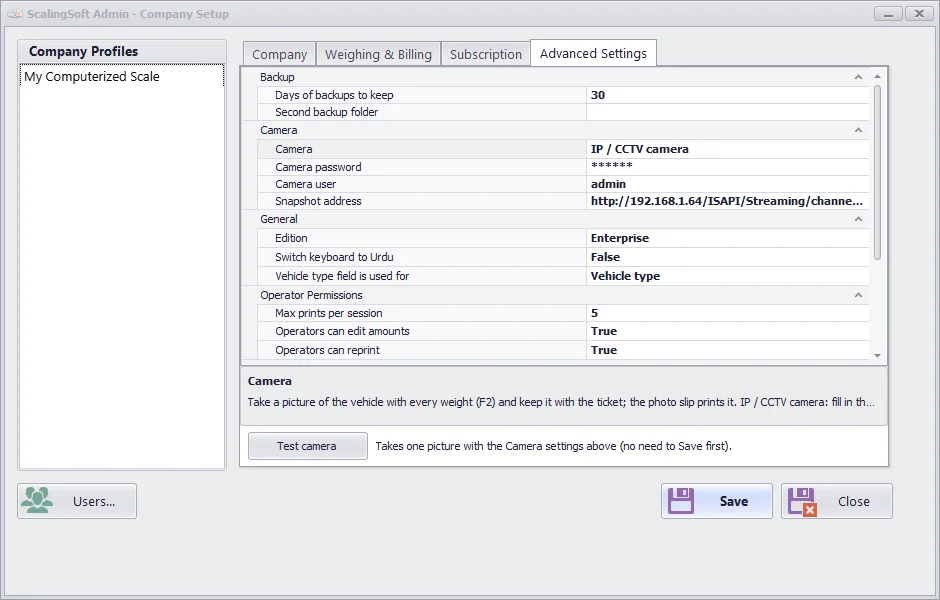
An IP/CCTV camera or USB webcam takes the vehicle's picture with every weight, printed on an A5 photo slip.
Automatic daily backup
The database is backed up every day, with an optional second folder such as a USB drive.
Users and roles
Admin and operator accounts; every weight and slip records who made it.
Works offline
Runs on one Windows PC with its own database. No internet and no server needed.
Urdu screens and your mandi's own words
Operators work in the language they read best, and the screens and slips use the words your market already uses. Set it once in the admin console.
- Screens in English or Urdu. Quick Weigh, First, Second and Continue Weight, Finalize, Edit Entry, Multi-Turn and the main ribbon show in Urdu (اردو). The admin sets the site's language; each operator can switch their own PC with the English / Urdu button.
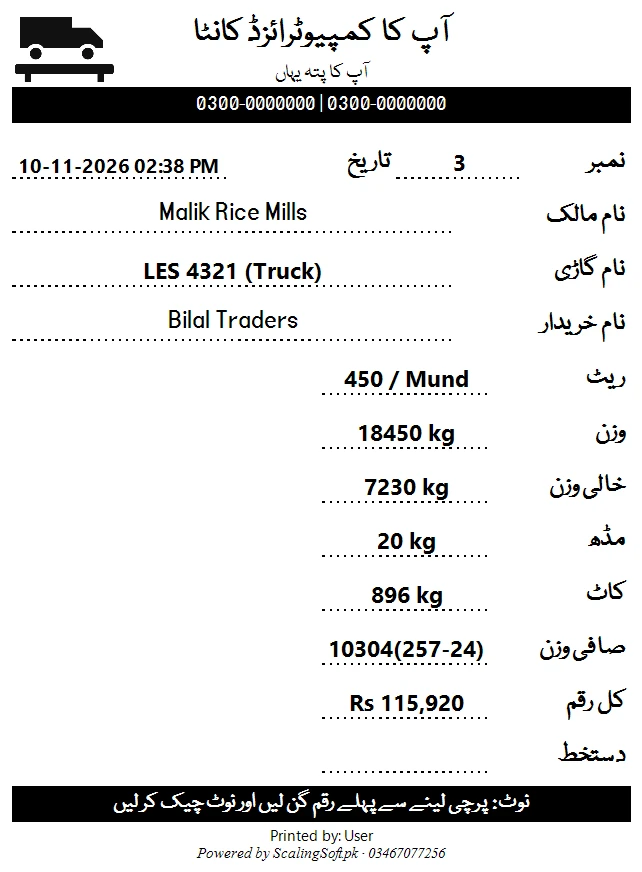
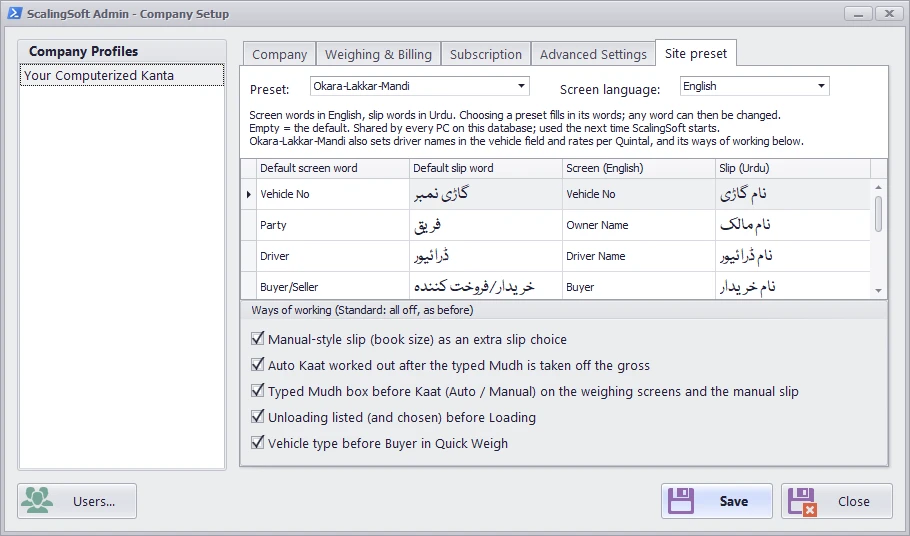
- Your market's words. Site preset sets the words for Vehicle No, Party, Driver, Buyer/Seller, Kaat and Dhara, on the screens and on the Urdu slips. A preset fills them in at once, for example Owner Name (نام مالک) and Mudh (مڈھ) for Okara's Lakkar Mandi.
- Your market's way of working. Each rule is a switch: the typed Mudh taken off before the automatic Kaat, Mudh before Kaat on screen, Unloading listed first, the driver before the buyer in Quick Weigh. A standard site keeps working as before.
- A slip like your slip book. The manual-style slip is a quarter of an A4 sheet (105 x 148 mm), laid out like a hand-written kanta slip book: number, date and time, owner, vehicle, buyer, rate, weights, Mudh, Kaat, net weight, total and signature.
- Your logo on every slip. Pick one from the slip logo gallery (trucks, trailers, a tractor trolley, the tarazu) or use your own picture.
Multi-turn weighing: one truck, many buyers
In the mandi one truck often unloads to several buyers, or loads from several sellers. ScalingSoft keeps it all on one ticket: every pass on the scale is a turn with its own buyer or seller, net weight, Kaat and charge.
First weight
The loaded truck comes on the scale. The ticket gets its serial number and the first slip prints.
Continue weight, turn by turn
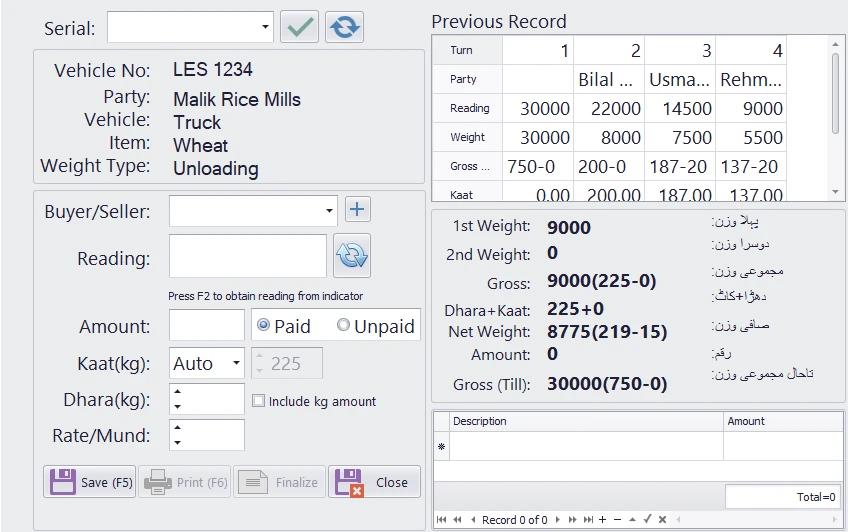
After each drop the truck comes back. Pick the buyer, press F2, save. The net weight for that buyer is the difference from the last reading, with automatic Kaat.
Any number of turns
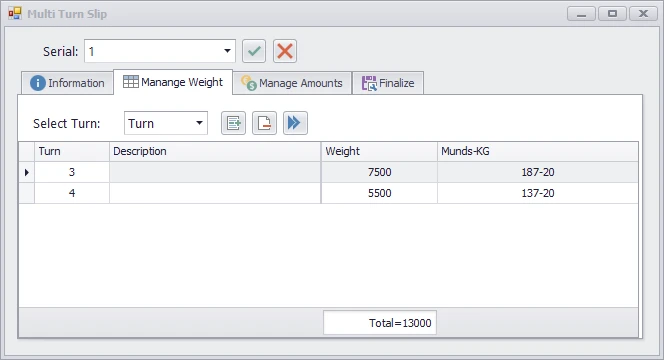
The screen shows every turn so far and the running total, so the operator always knows where the ticket stands.
Combine and finalize
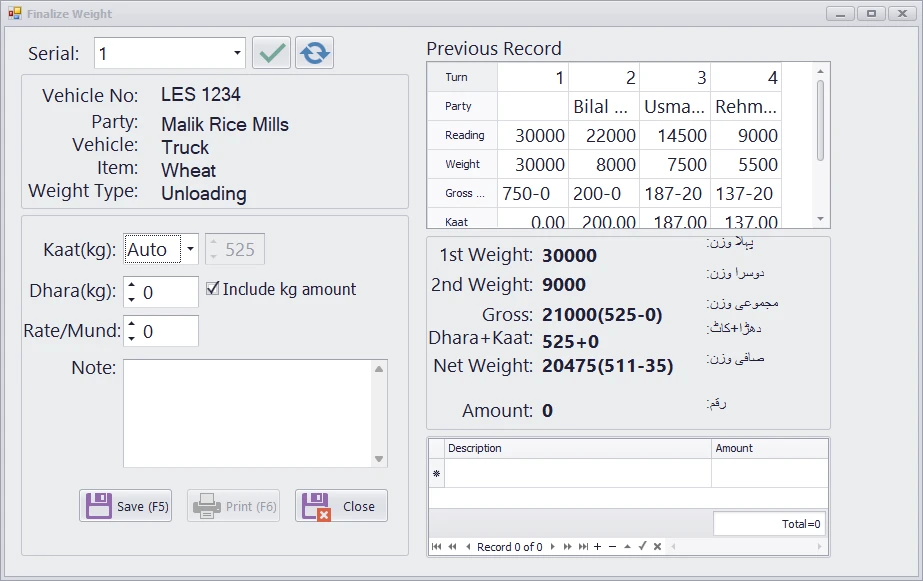
Print one multi-turn slip that adds the turns together, then finalize the ticket with the total gross, Kaat, net weight and amount.
And much more, already built in
Small things that save the operator time every day and keep the owner in control.
- Vehicle remembered. Type a vehicle number weighed before and its party, item and vehicle type fill in from its last ticket.
- Find any open vehicle. Search open tickets by serial or any part of the number plate, e.g. "5678".
- Open ticket warning. A vehicle that already has an open ticket is offered that ticket instead of a new one.
- Daily trips. Repeated trips against one empty weight, with a running total for the day.
- Extra charges. Labour, loading or any other charge line per turn and on the final slip.
- Edit Entry. Correct the ticket, any turn or the final slip later; every change goes into the edit history.
- Quick Weigh defaults. The admin sets the site's usual weight type, party, item, fee and slip once.
- Manual weight, clearly marked. If the scale is disconnected the weight can be typed; the box turns amber and the slip says Manual.
- Stable weight only. F2 takes the weight only when the indicator is steady and live, never while it is still moving.
- Outstanding fees and party statement. Who owes scale fees, for how many days, and each party's running balance.
- Expenses and cash in hand. Record the kanta's expenses; the Day Close subtracts them from fees collected.
- Export anywhere. Every report prints, or saves as PDF or Excel.
- Urdu keyboard switches itself. Urdu typing turns on automatically, except in English-only boxes such as the vehicle number.
- Urdu fonts included. The slip fonts install themselves; no setup on the PC.
- Vehicle type or driver name. Use the vehicle list for truck types or for driver names, as the site prefers.
- Several companies. Keep more than one company profile in one database and switch between them.
- Backup, restore and reset. Restore asks first and keeps the old copy; reset takes a backup before it clears anything.
- Accounts you can switch off. Disable an operator's login without losing the name on their old tickets.
Express or Enterprise
| Feature | Express | Enterprise |
|---|---|---|
| First weight | ✓ | ✓ |
| Second weight (two passes, closes the ticket) | ✓ | — |
| Continue weight (unlimited turns) | — | ✓ |
| Finalize | — | ✓ |
| Multi-turn slip | — | ✓ |
Express suits a simple in-and-out kanta. Enterprise is for mandis and mills where one vehicle makes many turns.
Keyboard first
- Ctrl+N
- First weight
- Ctrl+Q
- Quick Weigh
- Ctrl+R
- Continue / second weight
- Ctrl+F
- Finalize
- Ctrl+M
- Multi-turn slip
- Ctrl+E
- Edit entry
- Ctrl+A
- Find an open vehicle
- F2
- Take the weight
- F5 / F6
- Save / print
- Enter
- Next box, then Save
Screenshots and weighing slips
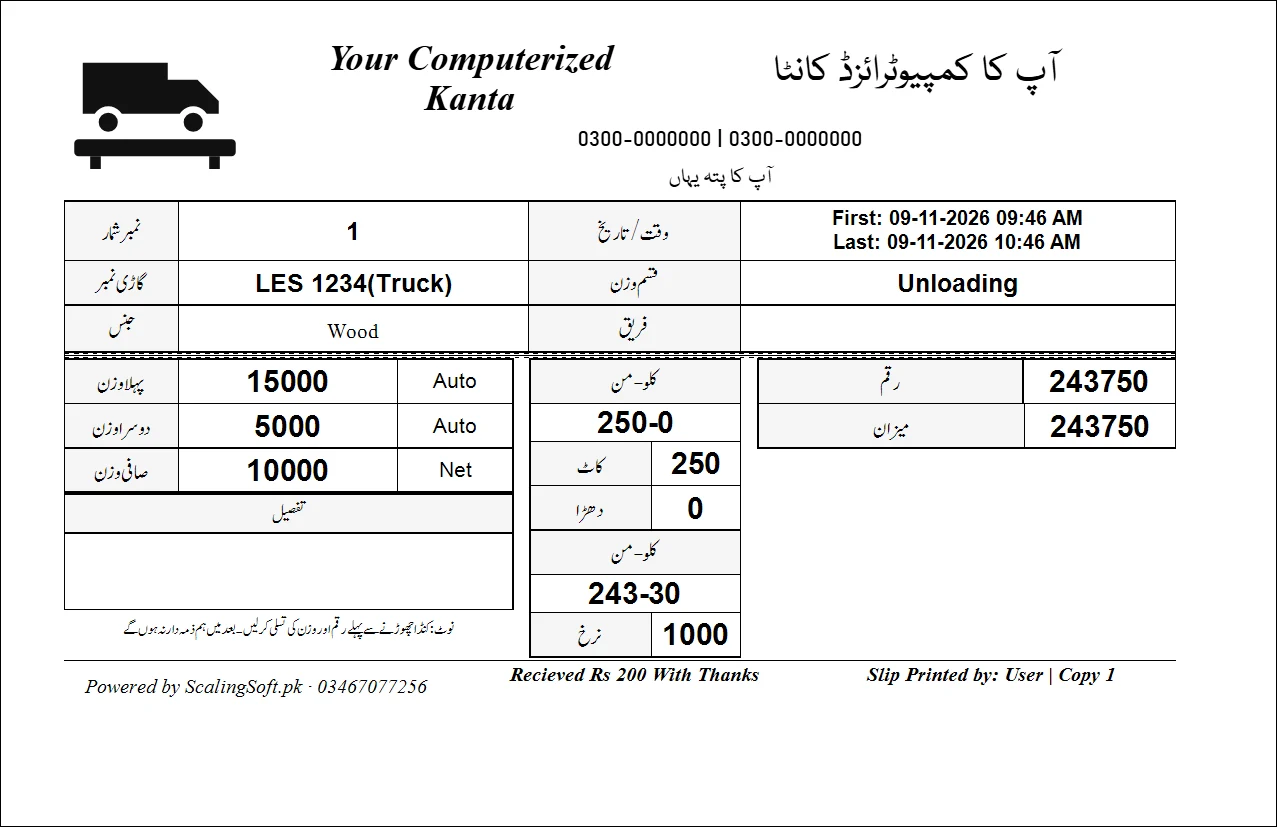
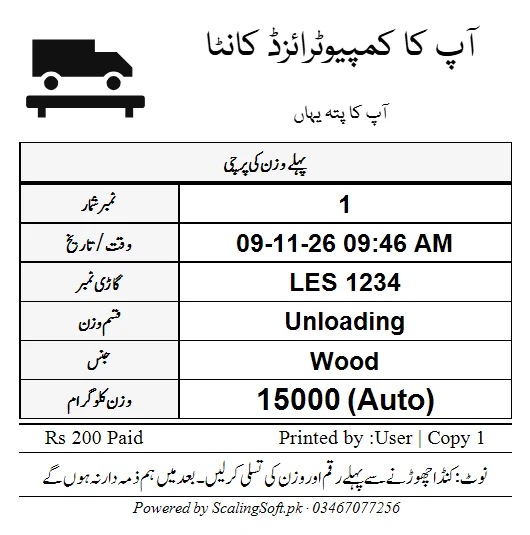
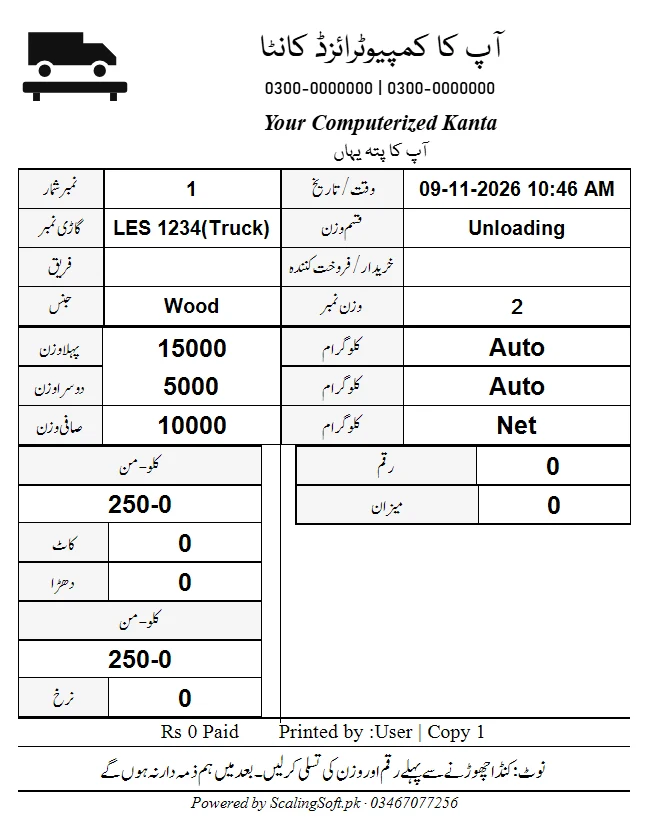
Real screens and slips from the software, with sample data. Swipe to see more.

How we set up your computerized kanta
From the first call to the first slip, we set it up with you.
Install
We install ScalingSoft on your weighbridge PC. It needs Windows 7 or later and no internet.
Connect the indicator
The indicator's serial cable goes to the PC and we set the COM port, so the live weight shows on screen.
Set up your kanta
Your name in Urdu and English, address, proprietors, Kaat, rate unit, and slips sized to your printer and paper.
Train your operators
We create the operator accounts and show them the weighing, printing and report screens.
Support
After that, help is a WhatsApp message or a call away.
Who uses ScalingSoft
Any site that weighs trucks, from a mandi kanta to a mill gate.
Grain and commodity mandis
Kaat, Dhara and rates per mund.
Rice mills
Paddy in, rice out, with party reports.
Flour mills
Wheat arrivals and loading by vehicle.
Steel mills
Scrap and finished goods by the truck.
Weighbridge words, explained
The terms used at Pakistani kantas and mandis, and how ScalingSoft handles each one.
- Kanta کانٹا
- A weighbridge or truck scale. A computerized kanta reads the weight into a computer and prints a slip instead of writing it by hand.
- Mund من
- The market unit of weight: 1 mund = 40 kg. ScalingSoft shows weights as munds-kg, so 10,000 kg is written 250-0.
- Quintal کوئنٹل
- 100 kg. A site can charge its rate per quintal instead of per mund.
- Kaat کاٹ
- A deduction on unloading, set in kg per mund, for example 1 or 1.5 kg. ScalingSoft works it out on every unloading.
- Dhara دھڑا
- An extra deduction in kg agreed between buyer and seller, typed in on unloading.
- Mudh مڈھ
- The word some mandis, such as Okara's Lakkar Mandi, use for the typed deduction (Dhara). ScalingSoft can take it off before working out the automatic Kaat.
- Turn باری
- Each pass of a vehicle over the scale. A multi-turn ticket has several turns, often one per buyer or seller.
- Parchi پرچی
- The weighing slip for the driver, with weights, deductions, rate and amount, in Urdu and English.
- Indicator انڈیکیٹر
- The weight display wired to the load cells. ScalingSoft reads it over an RS-232 serial cable.
کمپیوٹرائزڈ کانٹا سافٹ ویئر، اردو میں
اسکیلنگ سافٹ ویٹ برج یعنی کمپیوٹرائزڈ کانٹے کا سافٹ ویئر ہے۔ یہ انڈیکیٹر سے وزن خود پڑھتا ہے، کاٹ اور دھڑا لگاتا ہے، فی من یا فی کوئنٹل ریٹ سے رقم بناتا ہے، اور اردو اور انگریزی میں پرچی پرنٹ کرتا ہے۔
ایک گاڑی کے کئی وزن (ملٹی ٹرن)، ہر خریدار کا الگ حساب، روزانہ رپورٹ اور ڈے کلوز، سب ایک ہی جگہ۔ انٹرنیٹ کے بغیر چلتا ہے۔
وزن کی اسکرینیں بھی اردو میں، اور آپ کی منڈی کے اپنے الفاظ: نام مالک، نام خریدار، مڈھ اور کاٹ۔ پرچی بک کے سائز کی پرچی اور آپ کا اپنا لوگو۔
منڈی، رائس ملز، فلور ملز اور اسٹیل ملز کے لیے۔ ساہیوال سے پورے پاکستان میں۔
Weighbridge software: questions buyers ask
Which weight indicators does ScalingSoft support?
Any indicator that sends the weight over an RS-232 serial (COM) port, which most weighbridge indicators do. ScalingSoft reads common outputs such as ST,GS,+ 12340kg and fixed-width weight strings, and only takes the weight once it is stable. Send us your indicator's model on WhatsApp and we will confirm.
Does it work without internet?
Yes. ScalingSoft runs on one Windows PC at the weighbridge with its own database. It needs no internet connection and no server.
Do the slips print in Urdu?
Yes. Slips print in Urdu and English with your kanta's name, address and up to five proprietors with phone numbers. The Urdu fonts come with the software and install themselves.
Does it calculate Kaat and Dhara automatically?
Kaat is automatic: set it once in kg per mund (decimals such as 1.5 are allowed) and ScalingSoft deducts it on every unloading. It can also be typed by hand. Dhara is entered by hand. The net weight and amount update straight away.
Can one truck be weighed for several buyers?
Yes. In the Enterprise edition one ticket can have any number of turns, each with its own buyer or seller, net weight, Kaat and charge. A multi-turn slip combines the turns and Finalize closes the ticket with the totals. See multi-turn weighing.
Can the screens be in Urdu?
Yes. The weighing screens (Quick Weigh, First, Second and Continue Weight, Finalize, Edit Entry, Multi-Turn), their window titles and the main ribbon can show in Urdu. The admin sets the language for the site, and each operator can switch their own PC between English and Urdu with one button. See Urdu screens.
Can it use our mandi's own words and slip book?
Yes. The admin console's Site preset sets the words for Vehicle No, Party, Driver, Buyer/Seller, Kaat and Dhara on the screens and the Urdu slips, for example Owner Name and Mudh. A preset can also switch on the market's ways of working, such as taking the typed Mudh off before the automatic Kaat, and offer a book-size slip (105 x 148 mm) laid out like a hand-written slip book.
Can I charge per mund or per quintal?
Both. Each site chooses rate per mund (40 kg) or per quintal (100 kg). Weights are still shown as munds-kg on screens and slips.
Can it take a picture of the vehicle?
Yes, optionally. With an IP/CCTV camera (such as Hikvision or Dahua) or a USB webcam, ScalingSoft takes a picture with every weight and prints the first and last pictures on an A5 photo slip.
Can it print on my existing printer and pre-printed slips?
Yes. ScalingSoft prints its own slips, a two-copy slip on one page, or only the values onto your pre-printed stationery. The page size and margins are set for your printer and paper.
How does it stop operator fraud?
Operators can only print a slip a set number of times and every slip shows who printed it and the copy number. Every change to a saved ticket is logged with the old and new value, typed weights are marked Manual, and an optional camera keeps a picture of the vehicle with every weight.
Which computer do I need?
Any Windows PC with Windows 7 or later, a free serial (COM) port or a USB-to-serial cable for the indicator, and a printer. No internet or server is needed.
What support do you give?
We install the software, connect it to your indicator, set up your slips and train your operators. After that, help is a WhatsApp message or phone call away on 0346-7077256.
How much does ScalingSoft cost?
The price depends on the edition (Express or Enterprise) and options such as the camera. WhatsApp us with your city and the kind of weighbridge for a quote.
Talk to us
The quickest way is WhatsApp. Tell us your city and what you weigh.
- WhatsApp 0346-7077256
- Call 0346-7077256
- Sahiwal, Punjab, Pakistan